
A practical walkthrough of designing a service request system — from intake to resolution — using systems-first principles. Structure before tools. Clarity before automation.
Why Service Request Systems Fail
Every organisation handles requests. Customer queries, internal IT tickets, maintenance jobs, project briefs, procurement approvals — the list is endless.
Most organisations build their request systems by choosing a tool first. They configure forms, set up queues, define SLAs — and then wonder why requests still fall through the cracks.
The reason is consistent: they designed the technology before they understood the system.
A service request system is not software. It is the entire path from the moment someone asks for something to the moment it is delivered — and everything that happens in between.
Step 1: Define the Boundaries
Before anything else, define what the system is responsible for — and what it is not.
Boundaries prevent scope creep — the silent killer of service systems. Without them, a request system becomes a dumping ground for anything anyone needs, and no one can manage it effectively.
Step 2: Map the Lifecycle
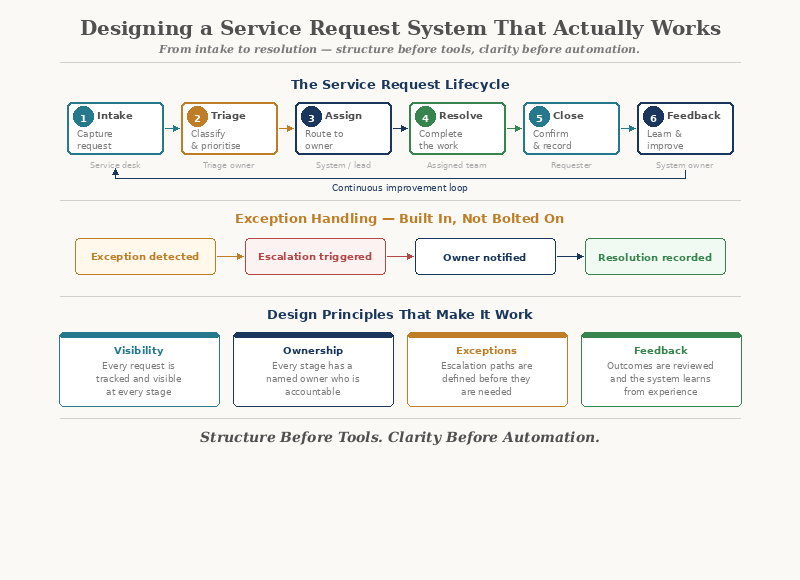
Every request has a lifecycle. Map it honestly — not the ideal version, but the real one.
A typical service request lifecycle includes:
- Intake — The request enters the system
- Triage — Someone assesses it: what is it, how urgent, who handles it?
- Assignment — It is routed to the right person or team
- Execution — The work is done
- Review — Someone confirms it meets expectations
- Closure — The request is marked complete and the requester is notified
- Feedback — The system learns from the outcome
Most systems only design for steps 1, 4, and 6 — and wonder why steps 2, 3, 5, and 7 create chaos.
The stages between intake and execution are where most time is lost — and where most systems have no design at all.
Intake
Request enters
Triage
Assess & prioritise
Execute
Work is done
Close
Confirm & notify
Step 3: Design the Intake
Intake is where most systems either succeed or fail. A well-designed intake does three things:
- Captures enough information to act on
- Prevents incomplete or duplicate requests
- Sets clear expectations for the requester
The most common intake problem is asking too little or too much.
Too little information:
- Triage team chases the requester for details
- Requests bounce back and forth
- Time is wasted before work even begins
Too much information:
- Requesters abandon the form
- Fields are filled with junk data
- The system feels like a burden, not a service
The goal is minimum viable context — just enough information for the next step to proceed without delay.
Step 4: Design the Triage
Triage is the most underdesigned stage in most service systems. It answers three questions:
Without deliberate triage design:
- Everything becomes "urgent"
- Requests are assigned to whoever is available rather than whoever is appropriate
- Similar requests are handled inconsistently
Good triage needs clear categories, defined priority criteria, and routing rules. It does not need to be complex — but it needs to exist.
Triage is where human judgement meets system structure. It should be supported by the system, not replaced by it.
Step 5: Define Ownership at Every Stage
The single most important design decision is ownership. At every stage of the lifecycle, someone must be clearly responsible for:
- Moving the request forward
- Communicating status
- Escalating when stuck
This does not mean one person owns the entire lifecycle. It means that at any given moment, there is never ambiguity about who holds responsibility.
Design the handoff between stages explicitly. Every transition should answer: who receives it, what information accompanies it, and what their expected action is.
Step 6: Make the Queue Visible
Most service request systems have a hidden queue problem. Requests enter the system and then disappear — into inboxes, spreadsheets, or someone's memory.
A well-designed system makes the queue visible to everyone who needs to see it:
- How many requests are waiting?
- How long have they been waiting?
- Which are approaching their deadline?
- Which are blocked — and why?
Visibility does not mean dashboards full of metrics. It means that anyone involved can quickly understand the current state of work.
If a request can sit unnoticed for days, the system is hiding failure.
Step 7: Design for Exceptions
No service request system handles everything through the standard path. Exceptions are inevitable. The question is whether they are designed for or ignored.
Common exceptions include:
- Requests that don't fit existing categories
- Urgent requests that bypass normal triage
- Requests that require approval from multiple parties
- Requests that are stuck because of external dependencies
For each exception type, define:
The escalation path
Who has authority to make a decision when the normal path doesn't apply?
The communication protocol
How is the requester kept informed when their request leaves the standard flow?
Systems that ignore exceptions force people to create workarounds. Workarounds become the real process — and the designed system becomes irrelevant.
Step 8: Close the Loop
Closure is not just marking a ticket as "done". It involves three things:
- Confirmation — The requester confirms the request was fulfilled to their satisfaction
- Notification — All relevant parties are informed of the outcome
- Learning — The system captures what happened for future improvement
Most systems handle the first. Few handle the third.
Without a feedback loop, the same problems repeat. The system processes requests but never improves. It becomes a machine that produces outputs without learning from them.
Where Automation Adds Value
Once the system is designed, automation can be applied deliberately — at points where it reduces friction without removing judgement.
Notice that automation supports the system at each stage. It does not replace the design — it accelerates it.
Where AI Can Help — Later
Once the system is running and producing data, AI can add a layer of intelligence:
- Identifying patterns in request types and volumes
- Predicting resolution times based on historical data
- Suggesting responses for common requests
- Flagging anomalies that need human attention
But AI needs clean, structured data to work with. That data comes from a well-designed system. Without it, AI produces noise — not insight.
The Principles Behind the Design
This walkthrough follows a set of principles that apply to any service system:
- Structure before tools — Design the system before choosing the software
- Flow over efficiency — Optimise how work moves, not just how fast tasks run
- Ownership at every stage — No request should ever be unowned
- Visibility by default — If it's hidden, it's a risk
- Exceptions by design — Plan for what doesn't fit
- Automation with accountability — Automate what's stable, keep humans where judgement matters
These are not abstract ideals. They are practical decisions that determine whether a system works or merely exists.
Closing Reflection
A service request system is not a ticketing tool. It is a designed pathway through which work flows — from need to resolution.
The organisations that get this right do not start with software. They start with questions: How does work arrive? Who owns it? How does it move? How do we know it's done?
Answer those clearly, and the technology becomes simple.
Design the system first. The tools will follow.